
How it works
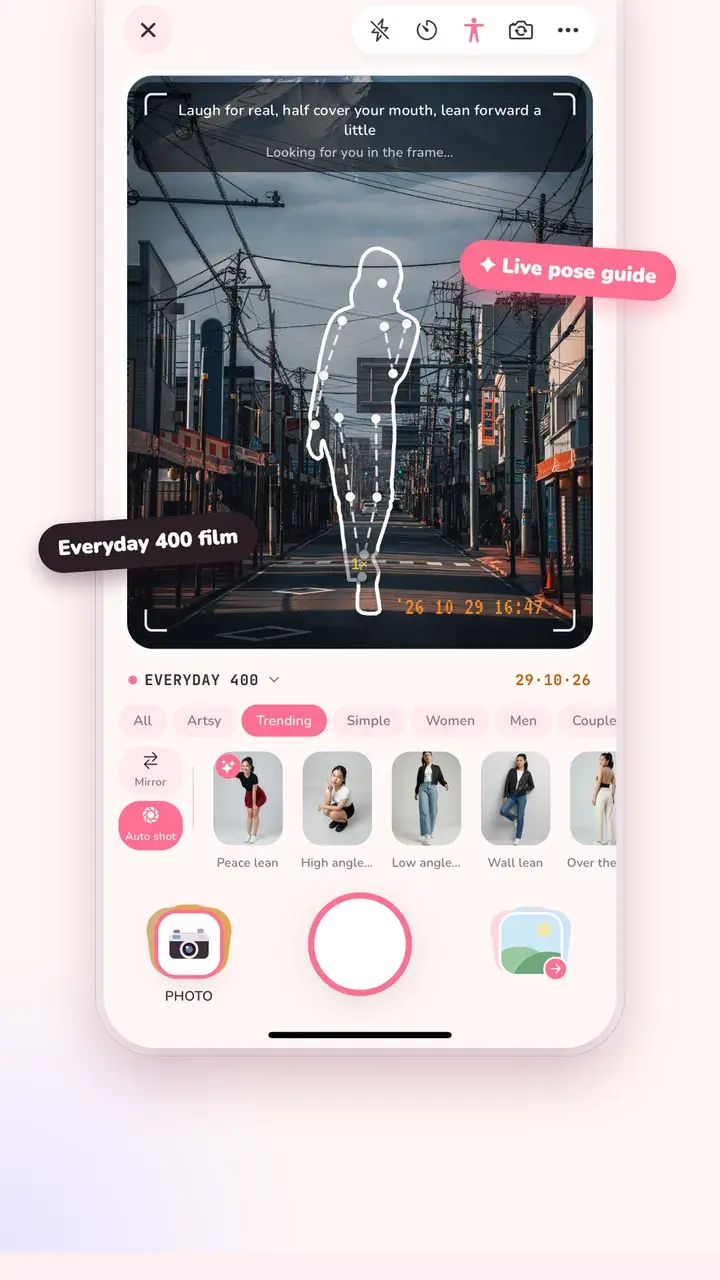
Tap the pose icon at the top of the camera and pick a pose. Its outline appears on the viewfinder with a short tip, like “laugh for real, half cover your mouth, lean forward a little.” The camera follows your body and shows when you're in the frame.
- Mirror flips the pose to the other side.
- Auto shot takes the photo the moment your pose matches, so nobody has to rush to the shutter.
- Poses marked ✦ are suggested for the scene the camera sees.
- Tips for the person holding the phone, like shooting from chest height for a half-body shot.
63 poses for the shots people actually take
Standing poses for full-length outfit shots, street poses, café and sitting poses, travel poses, poses for men, and couple poses for two people. Filter them by All, Artsy, Trending, Simple, Women, Men, Couples, Half body and Seated.
Make a pose from any photo
Saw a pose you like? With Tint Pro, “From a photo” turns any photo of a person into your own guide, saved next to the built-in ones.
Pose and film look together
The pose guide works with the live film looks, so you can frame, pose and see the final colour at the same time. The pose detection runs on your phone; no video or photo is uploaded.
Questions
How do I pose for photos if I'm awkward on camera?
Start with a Simple pose and give your hands a job: hold your bag strap, touch your hair, or put one hand in a pocket. Shift your weight to one leg and look slightly away from the lens. Each pose in Tint Cam comes with a tip like this.
Can the app take the photo for me?
Yes. Turn on Auto shot and the camera takes the photo when your body matches the outline. It works well with the self-timer for solo shots.
Is the pose guide free?
The pose guide and most poses are free. A few poses, and making a guide from your own photo, are part of Tint Pro.
Try it on your next photo
Free on iPhone and Android. No account.